-4.png?width=500&height=115&name=6789782.fs1.hubspotusercontent-na1.nethubfs6789782Product%20logosDatapharm_RGB_Logo1%20(3)-4.png)
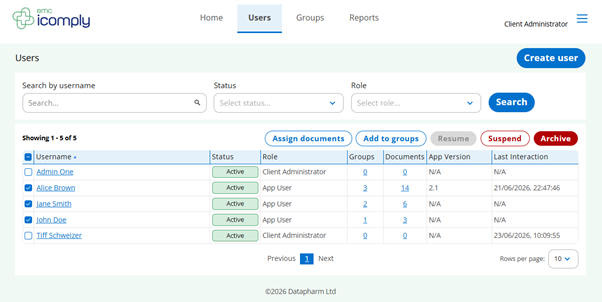
The Users screen is where you manage all users within icomply, giving client administrators full visibility and control over access, roles, and bulk assignments.
From this page you can:
- View all users in a structured table, including their status, role, group membership, and document access
- Search and filter users by username, status, or role to quickly find specific individuals
- Create new users using the Create user button
- Take bulk actions such as assigning documents, add to groups, suspend, or archive selected users
The table also provides helpful insights, including:
- The number of groups and documents assigned to each app user
- App version the user is on (encouraging updates to the latest version ensures they experience bug fixes and feature improvements)
- Last interaction date, helping client administrators monitor app user engagement