-4.png?width=500&height=115&name=6789782.fs1.hubspotusercontent-na1.nethubfs6789782Product%20logosDatapharm_RGB_Logo1%20(3)-4.png)
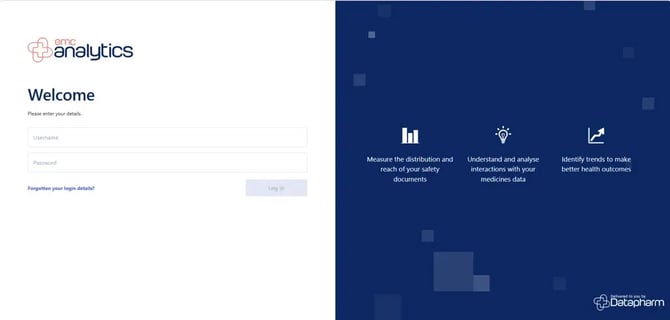
Log in to emc analytics https://analytics.medicines.org.uk/
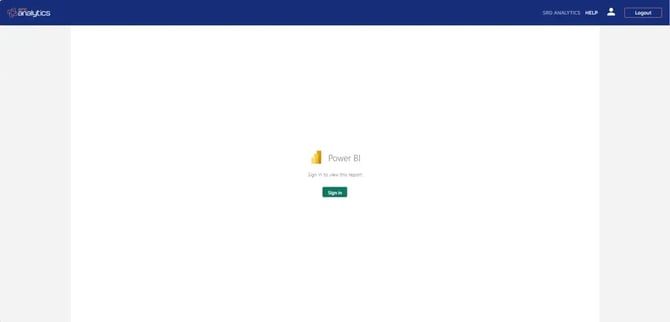
Sign in to power bi
Summary Analysis
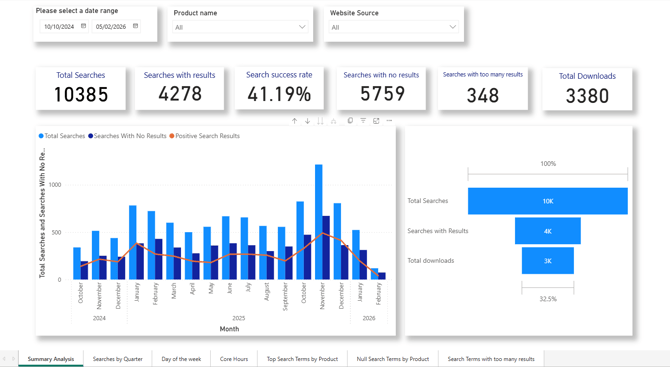
Top summary cards (key numbers)
-
Total Searches:
The total number of searches performed in the selected date range. -
Searches with Results:
Searches that returned at least one result. -
Search Success Rate:
Percentage of searches that produced results
(Searches with results ÷ Total searches). -
Searches with No Results:
Searches where users got no results at all. -
Searches with Too Many Results:
Searches that returned an excessive number of results (likely not very useful). -
Total Downloads:
SRDs downloaded after searching.
Left chart: Searches over time (monthly)
-
Blue bars = total searches each month
-
Darker blue bars = searches with no results
-
Orange line = positive search results
Right funnel chart: Search → Download journey
This shows how users progress:
-
Total Searches
-
Searches with Results
-
Downloads
Searches by Quarter
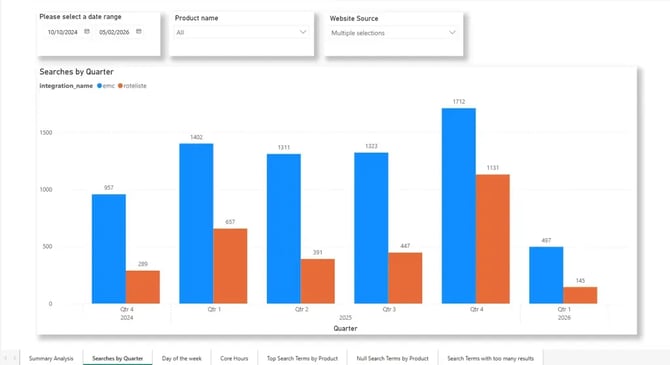
This chart shows search activity broken down by quarter, and compares where the searches came from (different integrations/sources).
X‑axis (bottom)
-
Quarters over time
Y‑axis (left)
-
Number of searches
Colours / Legend
-
Blue –
emc -
Orange –
rotelist
Total Searches by day
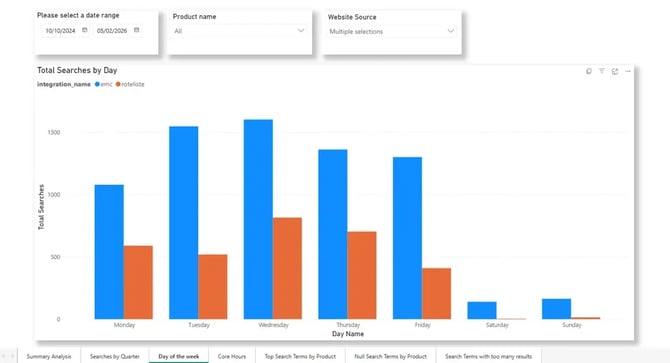
This chart shows how many searches are performed on each day of the week, broken down by website source (integration), for the selected date range.
X‑axis (bottom)
-
Days of the week: Monday through Sunday
Y‑axis (left)
-
Total number of searches
Colours / Legend
-
Blue –
emc -
Orange –
rotelist
Searches by time of day
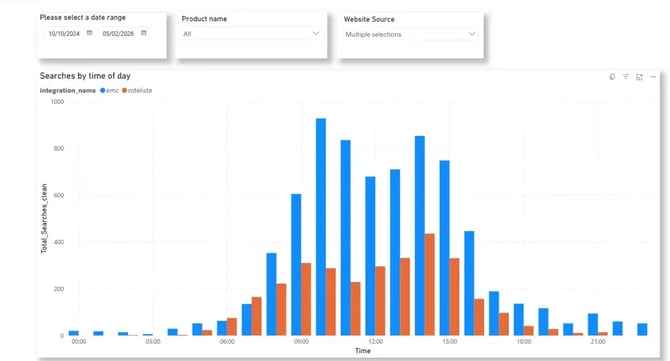
This chart shows when searches are performed during the day, broken down by time of day and website source, for the selected date range.
X‑axis (bottom)
-
Time of day, shown hour‑by‑hour (00:00 → 21:00)
Y‑axis (left)
-
Total searches
Colours / Legend
-
Blue –
emc -
Orange –
rotelist
Top search terms by product
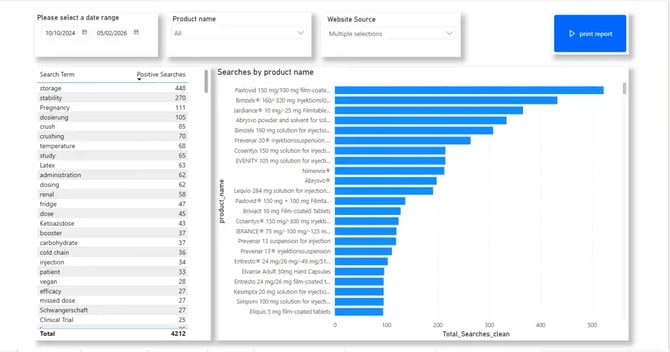
This screen shows what users are searching for and which products those searches successfully return an SRD for, within the selected date range.
It helps you understand:
-
Which search terms lead to successful results
-
Which products are most frequently found via srd search
-
How well search demand aligns with your srd content
Left table: Search Terms vs Positive Searches
What it shows
-
A list of search terms entered by users
-
Positive Searches = the number of times that search term returned at least one result
Right chart: Searches by product name
What it shows
-
A ranked bar chart of products that appear most often in successful searches
-
X‑axis: Total searches
-
Y‑axis: Product names
Null Searches by product
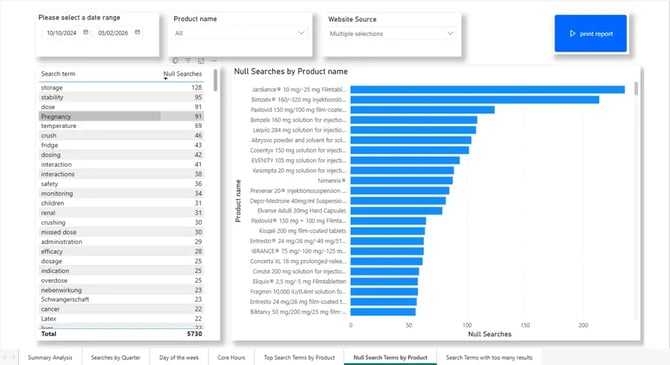
This dashboard view shows searches that returned no results — in other words, where users searched for something but the system couldn’t find any matching srd content
It highlights gaps in search and content coverage, helping you understand:
-
What users are trying to find but can’t
-
Which products are most often involved in failed searches
-
Where search tuning or new content is needed
Left table: Null Search Terms
What this shows
-
Search terms entered by users
-
Null Searches = how often that term returned zero results
Right chart: Null Searches by Product Name
What this shows
-
Products most often associated with failed searches
-
X‑axis: Number of null searches
-
Y‑axis: Product names
Searches with too many results
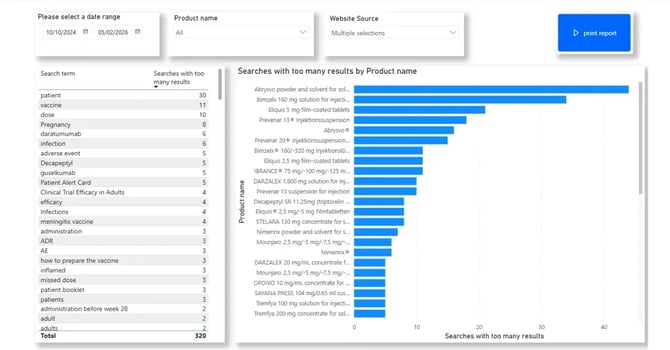
This dashboard shows searches that returned too many results — searches that were over‑broad, making it hard for users to find what they actually need.
It highlights search precision issues, where:
-
The query matches too much content
-
Results are not focused or actionable
Left table: Search terms with too many results
What this shows
-
Search terms entered by users
-
The number of times each term returned an excessive number of results
Right chart: Searches with too many results by product name
What this shows
-
Products most often involved when a search returns too many results
-
X‑axis: Count of over‑broad searches
-
Y‑axis: Product names