-4.png?width=500&height=115&name=6789782.fs1.hubspotusercontent-na1.nethubfs6789782Product%20logosDatapharm_RGB_Logo1%20(3)-4.png)
emc Publisher organises products into Product Groups to ensure efficient management and accurate content association.
When a product is created, the system automatically generates a Product Group based on its unique active ingredients. As a general principle, each product belongs to a single Product Group.
Products can be added to your portfolio in two ways:
When submitting documents or content, users must link them to the relevant product(s). A document or content item can only be shared across multiple products if those products belong to the same Product Group.
Refer to the diagrams below for a visual representation of Product Groups and Content Association relationships.
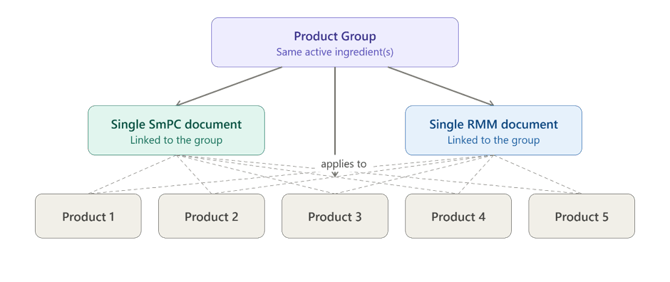
When the products are grouped correctly:
- users can easily link one document to all relevant products,
- updates or retirements of that document propagate consistently to all associated products.
Scenario: There are five products that share the same active ingredient(s). These products also use the same SmPC and RMM documents. By placing all five products within the same Product Group, users can associate a single SmPC and a single RMM with all products in that group, eliminating the need to manage them individually.
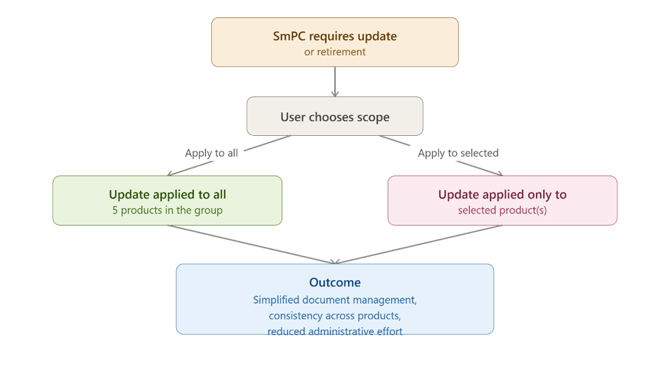
When an SmPC requires an update or needs to be retired, the change can be applied efficiently across the Product Group. Users can choose to:
- Apply the update to all five products at once, or
- Apply the update only to selected products within the same Product Group.
This approach simplifies document management, ensures consistency across related products, and reduces administrative effort.