-4.png?width=500&height=115&name=6789782.fs1.hubspotusercontent-na1.nethubfs6789782Product%20logosDatapharm_RGB_Logo1%20(3)-4.png)
Submitting as New or Update affects how version history is maintained and helps prevent duplicate products from being created on the emc.
When to submit as New
Submit as New when you are creating:
- A product that does not yet exist on the emc
- Content (such as an SmPC or PIL) being associated with a product for the first time
If a product or Product Group already exists and a New submission is attempted, you may receive a prompt or be contacted by the Data Quality team for clarification to avoid duplicate records.
After submitting a document as New, ensure it is associated with the correct product. Any document or content submitted as New that is not linked to a product will not be accepted.
When to submit as Update
Once a product has been created, and content such as an SmPC or PIL has been added for the first time, all future changes must be submitted as an Update.
Submitting as an Update keeps:
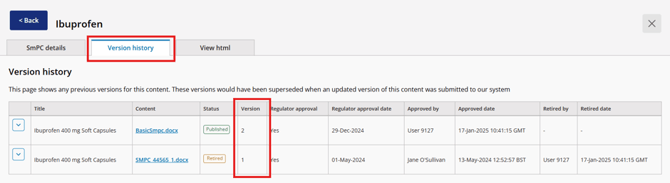
- Document version history
- Tracking notes
- Audit logs
These are maintained throughout the life of the product, including after retirement.
Document versions increase sequentially (e.g., version 1 → version 2 → version 3) as updates are submitted.