-4.png?width=500&height=115&name=6789782.fs1.hubspotusercontent-na1.nethubfs6789782Product%20logosDatapharm_RGB_Logo1%20(3)-4.png)
- Select Create submission in the top right corner and choose Update a product or Go to All Products from the left side menu, locate the product, and click Update
- You will be taken to the product’s Product Group Management screen.
- In the Product group management screen, open the Content tab and select SmPC
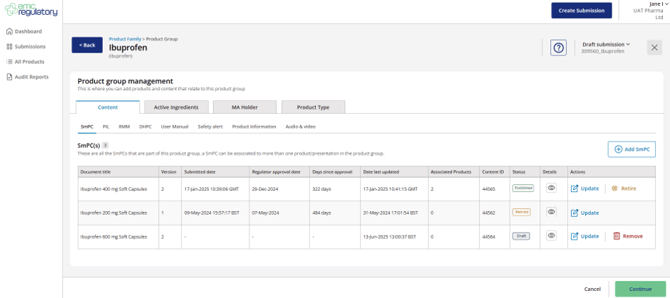
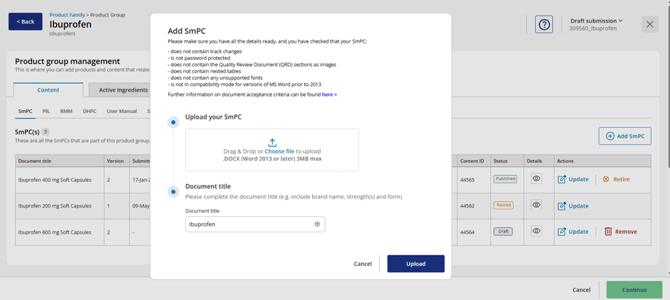
- Select Add SmPC or Update the new version
- Upload your SmPC Word file
- Must be .docx format
- Maximum file size 3MB
- Ensure the document title is unique for the medicine name and strength, as this is how it will appear in the Product Group for future updates.
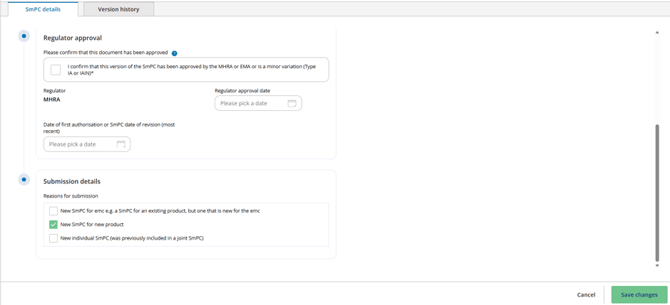
- Complete the fields for Regulator approval and Submission details.
- Select Save Changes.
- Select the product to associate with the document once it is in Draft status.
For detailed instructions, see How to associate a document/content with a product.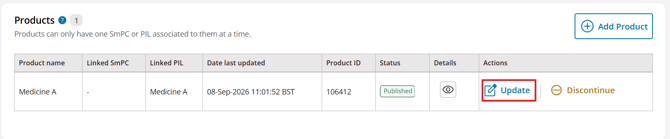
- Once the product association is complete, select Continue to proceed and complete the submission.
💡Can multiple content types be uploaded in one submission?
Yes. Multiple content types can be submitted within a single submission, together with the product details, provided the product has at least one associated SmPC and/or PIL that is either already published or included as part of the same submission.