-4.png?width=500&height=115&name=6789782.fs1.hubspotusercontent-na1.nethubfs6789782Product%20logosDatapharm_RGB_Logo1%20(3)-4.png)
To update one of your published products:
- Select Create submission in the top right corner and choose Update a product or Go to All Products from the left side menu, locate the product, and click Update.
- You will be taken to the product’s Product Group Management screen.
- Select Update next to the product you want to edit.

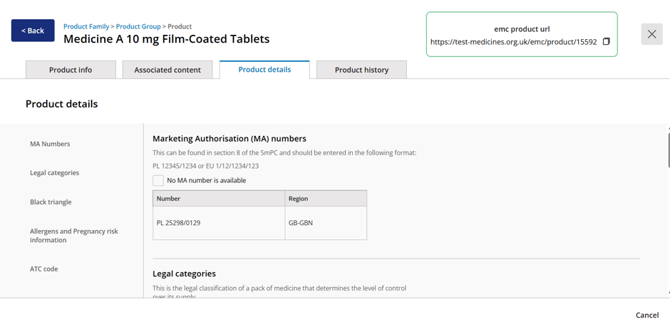
- In the Product Details tab, you can amend details such as:
- MA number
- Legal category
- Allergens
- ATC code
- Black Triangle status
- Select Save changes to confirm your updates or select Cancel to discard them.
- You will return to the Product Group Management page, where the product will now appear as Draft until submitted.
Important Notes
- The Legal Category can only be submitted or changed when it is included as part of a new updated version of the SmPC.