-4.png?width=500&height=115&name=6789782.fs1.hubspotusercontent-na1.nethubfs6789782Product%20logosDatapharm_RGB_Logo1%20(3)-4.png)
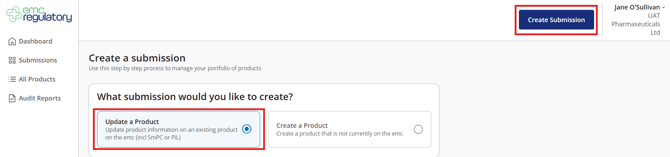
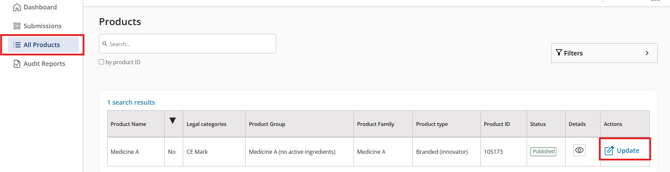
- Select Create submission in the top right corner and choose Update a product or Go to All Products from the left side menu, locate the product, and click Update.
- You will be taken to the product’s Product Group Management screen.
- Find the product presentation and select Discontinue.

- Choose a Reason for Discontinuation from the dropdown list.
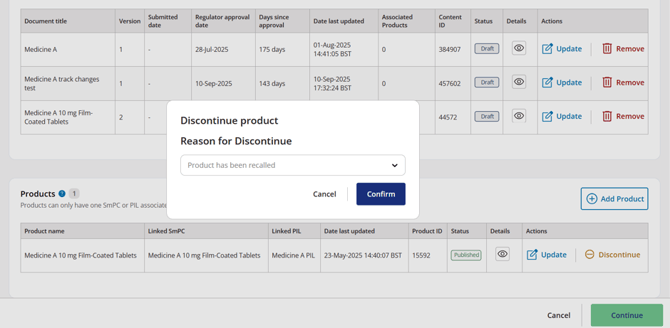
- Select Click Confirm
- Select Continue to proceed with submission.
- Review the details on the Submission Summary page.
- Select Submit to publish the discontinuation
- The discontinued banner will appear immediately on emc after submission
Undoing the discontinuation
-
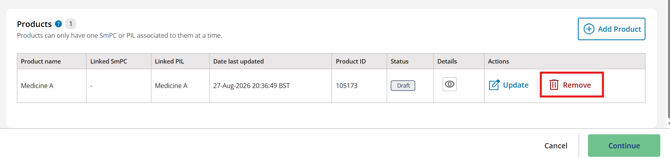
If you change your mind before submitting, select Cancel, then Remove to revert the product back to its original published state