-4.png?width=500&height=115&name=6789782.fs1.hubspotusercontent-na1.nethubfs6789782Product%20logosDatapharm_RGB_Logo1%20(3)-4.png)
A Product Group is a collection of related products that share common characteristics, including the same name (brand or generic) and active ingredients. Grouping products together makes it easier to manage content that applies to multiple products or presentations at once.
What is the best practice for naming Product Group?
The product group name should include only the brand or generic name, and not the product’s strength or form.
This is because a single product group can contain multiple products with different strengths and forms, all managed under the same group.
Need help? Click Brand or generic name for guidance on selecting the correct product group name.
- Select Create submission in the top‑right corner of the screen and select Create product.
- Enter the required product details:
- Product type: Branded (innovator), Generic and Branded Generic
- Brand or generic name
- Active ingredient(s)
💡Important: After selecting an active ingredient from the list, click Add to confirm the selection. If Add is not selected, the active ingredient will not be included in this product group.
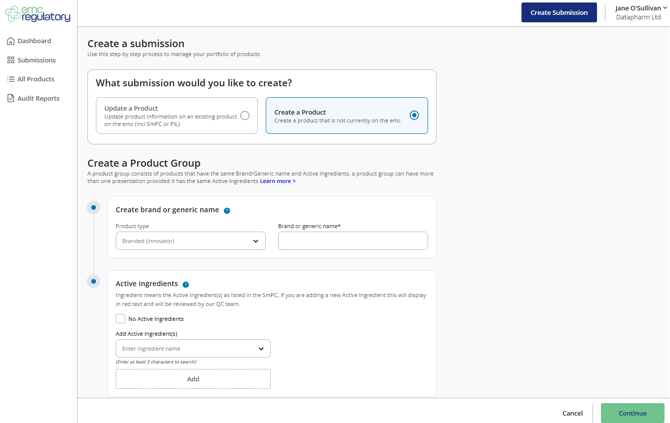
- Select Continue.
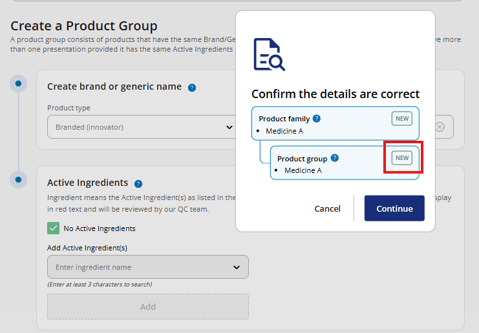
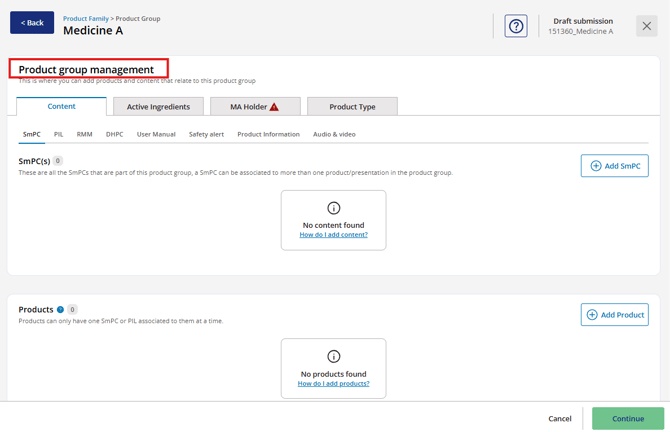
- You will be taken to the Product Group Management screen, where you can:
-
- Add document/Content and
- Add Product